DisplayFlip v1.1.0 • Native .NET 10 + WPF-UI 4.3 Fluent

Precision Multi-Monitor Layout & Profile Switcher for Windows 11

Built on native Win32 QueryDisplayConfig and SetDisplayConfig APIs. Arrange displays visually on a 2D canvas, auto-wake sleeping screens from Solo mode, and switch profiles via hotkeys or CLI.

DisplayFlip-v1.1.0-win-x64.zipRecommended • ~3 MB ZIP (Requires .NET 10 Desktop Runtime)
Get ZIP →
DisplayFlip-v1.1.0-Standalone-win-x64.exePortable • ~74 MB Single EXE (Zero dependencies)
Get EXE →
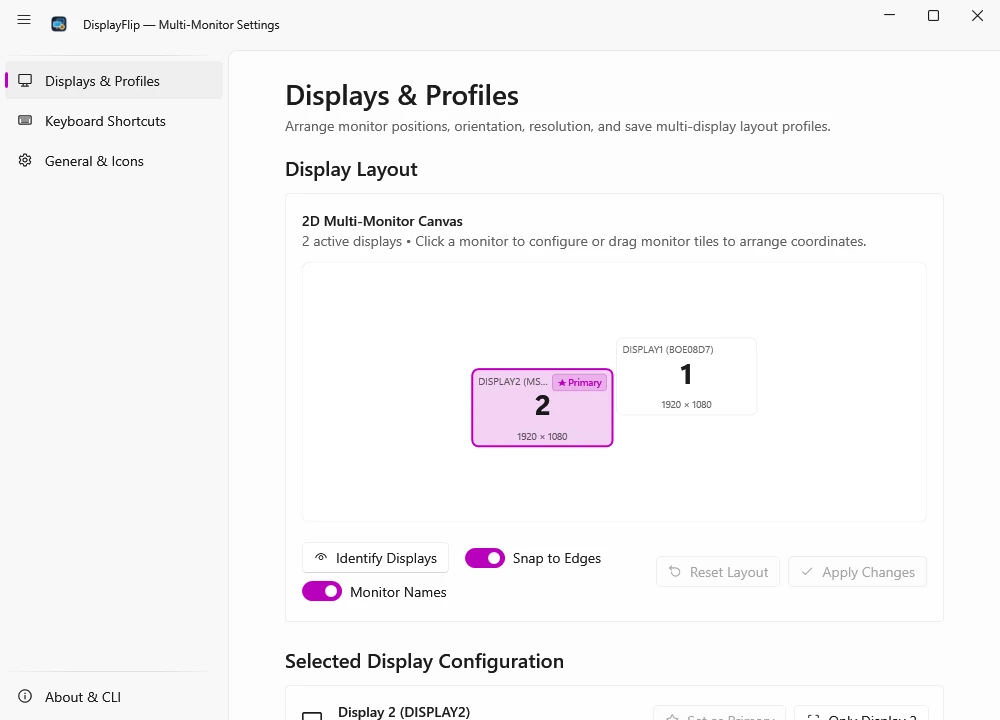
Displays & Profiles — 2D Multi-Monitor Canvas
2 active displays • Click a monitor to configure or drag monitor tiles to arrange coordinates.
DISPLAY2 (MSI40B7)★ Primary
2
DISPLAY1 (BOE08D7)
1
Selected: Display 2 (DISPLAY2) • Resolution 1920 × 1080 @ 60 Hz • Position (0, 0) • Primary Display
CLI Equivalent: DisplayFlip.exe --apply "Studio Desk"

Why DisplayFlip Outperforms Built-In Win + P

Windows' built-in DisplaySwitch.exe (Win + P) only toggles four coarse projection states and frequently forgets left/right offsets or primary screen roles when switching between single-screen and dual-screen setups.

CapabilityWindows Win + PDisplayFlip v1.1.0
Save named 2D monitor profilesNoUnlimited JSON profiles
Swap Primary & X/Y coordinates in 1 clickManual Windows Settings dragCtrl+Alt+F / --swap / Tray
Auto-Wake sleeping screen from Solo modeManual 2-step switchAutomatic Extend wake + apply
Graceful Partial-Apply when monitor unpluggedFails or causes black screenSafely configures connected screens
Hardware EDID Model ID on canvas tilesGeneric 1 / 2 numbersShows DISPLAY2 (MSI40B7)

Real Windows 11 App Screenshots

Actual unretouched captures from DisplayFlip v1.1.0 running on Windows 11 (.NET 10 + WPF-UI 4.3 Fluent), matching our GitHub showcase in both Light and Dark themes.

DisplayFlip Displays and Profiles screen in Light Mode
Displays & Profiles2D Canvas, Monitor Labels, Snap & Profiles

Arrange displays visually on a proportional 2D canvas with magnetic edge snap, alignment guides, enriched EDID hardware names like DISPLAY2 (MSI40B7), and saved JSON layout profiles.

View on GitHub

PowerShell, Task Scheduler & AutoHotkey Builder

Select an action flag and automation target to generate tested DisplayFlip v1.1.0 syntax for background scripts, shortcuts, and Task Scheduler.

DisplayFlip.exe --apply "Studio Desk"

Release Changelog (v1.1.0 & v1.0.0)

Every DisplayFlip update is tracked on our dedicated release history page and in our cumulative SnipGeek technical note.

Full Changelog →
v1.1.0Latest15 November 2026
GitHub Release

Bilingual UI & CLI Parity

Introduces complete English and Bahasa Indonesia parity across the Fluent UI, System Tray, 2D canvas, overlays, and CLI commands without restarting.

  • Central LocalizationCatalog supporting instant zero-restart switching between English and Bahasa Indonesia.
  • Non-mutating --lang <id|en> CLI override for single command runs without altering saved settings.
  • Refreshed English Light/Dark showcase captures and expanded suite to 316 passing xUnit tests.
.NET 10 LTSWPF-UI 4.3.0316 xUnit Tests
v1.0.015 November 2026
GitHub Release

Windows 11 Fluent WPF-UI 4.3 LTS Release

Full .NET 10 LTS modernization featuring native Windows 11 Mica design, proportional 2D drag-and-drop canvas, Smart Auto-Wake profiles, and headless CLI automation.

  • Migrated to .NET 10 LTS and WPF-UI 4.3.0 with native Mica backdrop and Per-Monitor V2 DPI awareness.
  • Interactive 2D monitor canvas with magnetic edge snap, alignment guides, and EDID model labels.
  • Smart Auto-Wake profile switching from Solo/Duplicate mode and conflict-guarded global hotkeys.
Initial LTSMica BackdropSingle-File x64

Multi-Monitor Tutorials on SnipGeek.com

Read our in-depth troubleshooting guides and Windows 11 tutorials on the main SnipGeek blog:

1. How to Connect Your Laptop to an External Monitor on Windows 11 & Ubuntu

Complete guide to HDMI, DisplayPort, and USB-C Alt Mode connections, refresh rate tuning, and dual-boot display alignment.

2. Fix USB-C Port Reset Failed When Connecting a Portable Monitor

Real-world diagnosis of USB_RESET_FAILURE on MSI portable monitors caused by faulty E-Marker USB-C cables.

3. Windows 11 Dual-Monitor Layout Quick Reference & Hotkeys Guide

How to quickly switch primary displays, lock coordinates, and automate multi-screen workflows with zero background bloat.

4. How Windows 11 CCD SetDisplayConfig Handles Multi-Monitor Coordinates

Deep dive into Win32 CCD SetDisplayConfig coordinate rules, primary display (0,0) constraints, and contiguous topology math.

5. DisplayFlip Cumulative Release Notes & Architecture History

Complete version history, architecture milestones, and release packages for v1.1.0 bilingual parity and v1.0.0 LTS modernization.

Frequently Asked Questions

Can I run CLI flags silently without launching UI windows?

Yes. Every CLI flag runs straight against Windows CCD and exits cleanly, or passes --tray to keep background hotkeys active.

What happens when I pass --lang en or --lang id?

The --lang flag overrides CLI output text for that single command without altering your saved application UI language.

Which download fits my Windows PC best?

Pick DisplayFlip-v1.1.0-win-x64.zip (~3 MB) if .NET 10 Desktop Runtime is installed, or choose DisplayFlip-v1.1.0-Standalone-win-x64.exe (~74 MB) for zero prerequisites.

How does Auto-Wake recover monitors from Solo mode?

DisplayFlip detects disconnected display paths when a monitor is asleep, promotes Windows back to Extend topology cleanly, and applies exact X/Y coordinates in one step.